> ## Documentation Index
> Fetch the complete documentation index at: https://nocturneidle.mintlify.site/llms.txt
> Use this file to discover all available pages before exploring further.
# Predefined Reasons
> Create a library of reusable reason texts that appear as autocomplete suggestions when running staff commands.
**Predefined Reasons** save your team from retyping the same explanations every time they run a `/staff` command. Set up reasons like "Inactivity" or "Failed Trial Period" once, and they'll surface as autocomplete suggestions whenever a reason field is required.
Staff are never restricted to the predefined list. Typing a custom reason that isn't suggested is still allowed.
***
Managing Reasons
You can add, view, and delete your predefined reasons using the following command, which shows up an interactive panel.
User: Manage Server
```text Command theme={null}
/config reasons
```
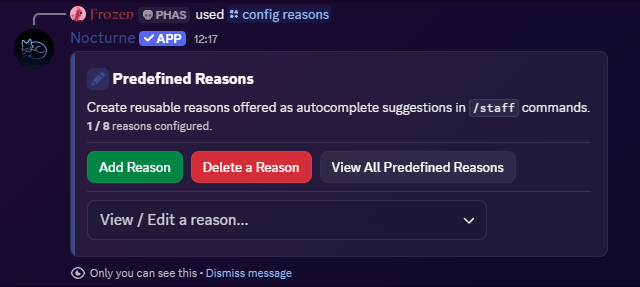 The panel displays the following components:
* A **green Add Reason** which opens up a modal which allows you to input a label as well as the actual content.
* A **red Delete a Reason button** which opens up a modal to allow you to delete a specific predefined reason.
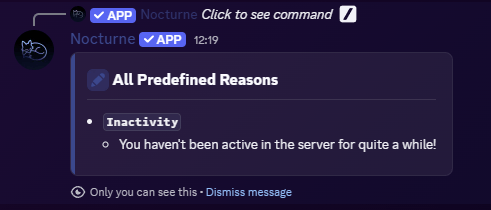
* A **grey View All Reasons button** which lists all reasons, including the labels and description.
* A **View / Edit select menu** from which you can choose an already set reason and edit it.
***
The panel displays the following components:
* A **green Add Reason** which opens up a modal which allows you to input a label as well as the actual content.
* A **red Delete a Reason button** which opens up a modal to allow you to delete a specific predefined reason.
* A **grey View All Reasons button** which lists all reasons, including the labels and description.
* A **View / Edit select menu** from which you can choose an already set reason and edit it.
***
How the Interactive Panel Works
Upon running the command, Nocturne will present you with two buttons:
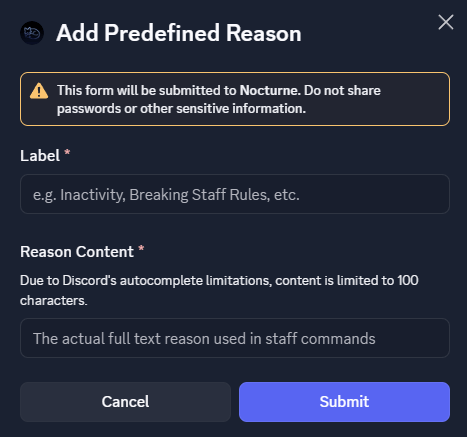
* **Add Reason** button
* Clicking this opens a Discord Modal where you can construct your reason.
* You have to provide a **Label**, which is unique and will be of a maximum length of 25 characters. It is not used as a part of the predefined reasons, but rather it is for internal management.
* You have to provide the **Content**, which is the actual reason that gets autocompleted. This is what the users see, and the log messages show. This can be a maximum of 100 characters.
Due to Discord's Autocomplete limitation, the content can only be a maximum of 100 characters.
Only the **Reason Content** appears in the `/staff` command's autocomplete suggestions. Labels are a management convenience only and are never shown to the person running the command during autocomplete. The autocomplete search also matches against labels internally, so typing a label name (e.g. `Inactivity`) will still surface the matching reason's content as a suggestion.
 * **Delete a Reason** button
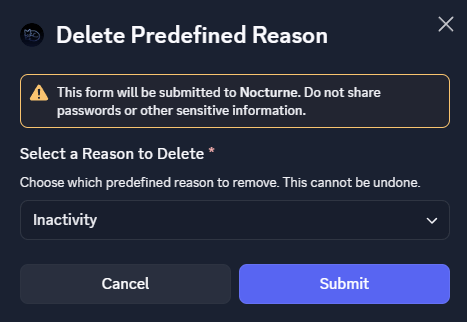
* Clicking this opens a Discord Modal which will contain a select menu with all of your predefined reasons.
* You have to select one and submit. On submission, the chosen predefined reason will be deleted.
* **Delete a Reason** button
* Clicking this opens a Discord Modal which will contain a select menu with all of your predefined reasons.
* You have to select one and submit. On submission, the chosen predefined reason will be deleted.
 * **View All Reasons** button
* Clicking this shows a follow-up message containing all the reasons configured in your server.
* **View All Reasons** button
* Clicking this shows a follow-up message containing all the reasons configured in your server.
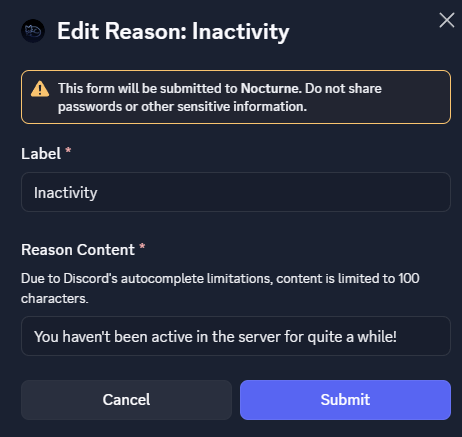
 * **View / Edit** select menu
* This select menu lists all the predefined reasons in your server.
* Selecting one of the options shows a Discord Modal where you can edit the corresponding reason.
* **View / Edit** select menu
* This select menu lists all the predefined reasons in your server.
* Selecting one of the options shows a Discord Modal where you can edit the corresponding reason.