> ## Documentation Index
> Fetch the complete documentation index at: https://nocturneidle.mintlify.site/llms.txt
> Use this file to discover all available pages before exploring further.
# Umbrella Role
> A single server-wide role that Nocturne automatically gives to every active staff member across all trees, and removes when they no longer hold any staff position.
An **Umbrella Role** spans all of your trees. Where Base Roles and Linked Roles are scoped to one tree, the Umbrella Role represents "this person is staff somewhere in this server". Think a collective `@Staff` role that Nocturne keeps accurate automatically.
***
How It Works
Once an Umbrella Role is configured, Nocturne folds it into the role math for every staff action automatically.
| Action | Umbrella Role Behaviour |
| ---------------- | ----------------------------------------------------------------------------------------------------------------- |
| `/staff hire` | Added if the member doesn't already have it. |
| `/staff promote` | Added back if somehow missing; otherwise untouched. |
| `/staff demote` | Added back if somehow missing; otherwise untouched. |
| `/staff fire` | Removed **only if** the member holds no Base Role in any other tree. If they're still staff elsewhere, it's kept. |
Because the Umbrella Role's job is to mark "is this person staff *anywhere*", Nocturne checks the member's roles across **every tree in the server**, not just the one the action was run against, before deciding to remove it.
Umbrella Role changes are intentionally **not** included in the staff action log embed sent to your log channel. Only the primary Base Role (and any Linked Role) changes for the relevant tree are logged.
***
Setting an Umbrella Role
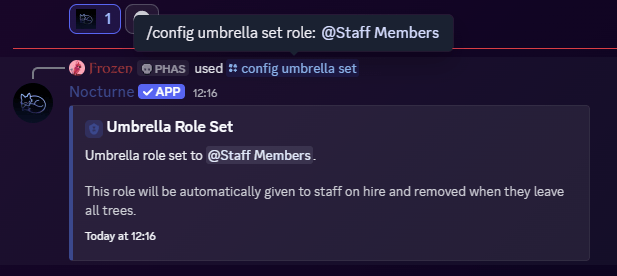
To set up an umbrella role, run the following command:
User: Manage Server
```text Command theme={null}
/config umbrella set
```
```text Example theme={null}
/config umbrella set @Staff
```
 This role cannot be a Base Role or a Linked Role in **any** tree. Further, this role can no longer be added to any tree.
***
This role cannot be a Base Role or a Linked Role in **any** tree. Further, this role can no longer be added to any tree.
***
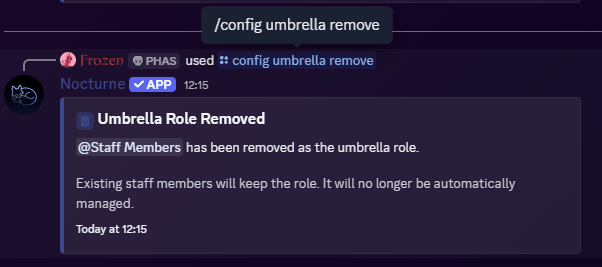
Removing the Umbrella Role
If you no longer need a server-wide staff role, you can remove the configuration. Nocturne will stop managing it going forward.
User: Manage Server
```text Command theme={null}
/config umbrella remove
```