> ## Documentation Index
> Fetch the complete documentation index at: https://nocturneidle.mintlify.site/llms.txt
> Use this file to discover all available pages before exploring further.
# Tree Basics
> A Tree in Nocturne is a container for a specific staff hierarchy. Each tree acts like a ladder/promotional pathway and is used to keep departments separate (e.g., Moderation, Events).
Creating a Tree
To start building a hierarchy, you first need to create the tree itself.
User: Manage Server
```text Command theme={null}
/tree create
```
```text Example theme={null}
/tree create name:Moderation
```
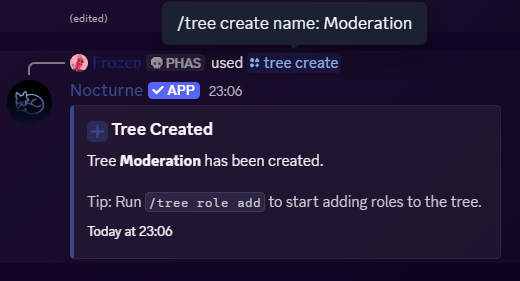 Tree names can be a maximum of 32 characters long. We recommend keeping them short and recognisable, as you will be typing them out frequently when running staff commands!
***
Tree names can be a maximum of 32 characters long. We recommend keeping them short and recognisable, as you will be typing them out frequently when running staff commands!
***
Viewing Trees
You can check the configuration of your trees at any time. This will display all the Base Roles, their Hierarchy Positions, and any Linked Roles attached to them, along with the status of custom DM Notices for that tree.
User: Manage Server
```text Command theme={null}
/tree view
```
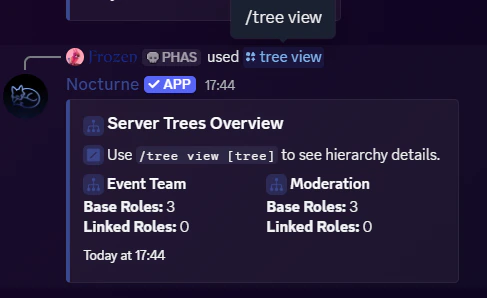
**If you leave `[tree]` parameter blank,** the bot will display a high-level summary of *all* the trees currently configured in your server.
```text Example theme={null}
/tree view
```
 **If you provide a** `[tree] `**parameter,** the bot will display a detailed breakdown of that specific tree.
```text Example theme={null}
/tree view tree:Moderation
```
**If you provide a** `[tree] `**parameter,** the bot will display a detailed breakdown of that specific tree.
```text Example theme={null}
/tree view tree:Moderation
```
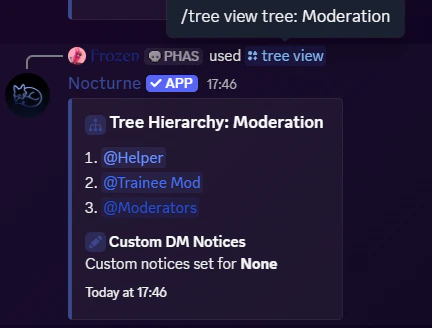 In the detailed tree breakdown, you might see two types of **issues**:
* **Warning symbol** next to a role: Nocturne cannot manage this role because it sits above Nocturne's own role in the server hierarchy. Fix it by dragging Nocturne's role above it in `Server Settings > Roles`.
* **(Deleted)** next to a role: The role has been deleted from your server. Nocturne will throw errors until you run `/fix` to clean it up. See the [System Fix Guide](/commands/system-fix) for details.
***
In the detailed tree breakdown, you might see two types of **issues**:
* **Warning symbol** next to a role: Nocturne cannot manage this role because it sits above Nocturne's own role in the server hierarchy. Fix it by dragging Nocturne's role above it in `Server Settings > Roles`.
* **(Deleted)** next to a role: The role has been deleted from your server. Nocturne will throw errors until you run `/fix` to clean it up. See the [System Fix Guide](/commands/system-fix) for details.
***
Renaming a Tree
If you ever need to rebrand a department, you can easily rename an existing tree without having to recreate all the roles inside it.
User: Manage Server
```text Command theme={null}
/tree rename
```
```text Example theme={null}
/tree rename tree:Event name:Event Team
```
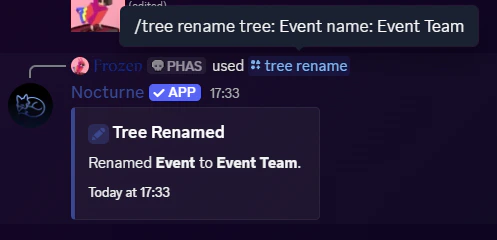 Renaming a tree updates it everywhere in the database. You will immediately use the new name when running `/staff` commands.
***
Renaming a tree updates it everywhere in the database. You will immediately use the new name when running `/staff` commands.
***
Deleting a Tree
If a department is shut down or you want to start from scratch, you can permanently delete a tree.
User: Manage Server
```text Command theme={null}
/tree delete
```
```text Example theme={null}
/tree delete name:Partnership
```
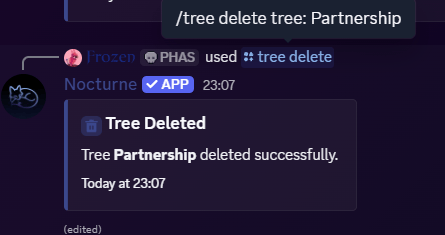 **This action cannot be undone.** Deleting a tree will permanently wipe its configuration from the database, including all assigned Base Roles, Linked Roles, and custom DM Notices configured for that tree. \
*(Note: This does **not** delete the actual roles from your Discord server settings, it just unlinks them from the bot).*
**This action cannot be undone.** Deleting a tree will permanently wipe its configuration from the database, including all assigned Base Roles, Linked Roles, and custom DM Notices configured for that tree. \
*(Note: This does **not** delete the actual roles from your Discord server settings, it just unlinks them from the bot).*