> ## Documentation Index
> Fetch the complete documentation index at: https://nocturneidle.mintlify.site/llms.txt
> Use this file to discover all available pages before exploring further.
# Linked Roles
> Linked roles are secondary or cosmetic roles automatically assigned or removed alongside a base role.
While base roles determine a staff member's position in the hierarchy, **Linked Roles** are additional roles that allow you to give your staff members the extra permissions they need to actually do their job or participate in the community.
When a user is hired or promoted into a base role, Nocturne will automatically assign all of its linked roles. When they are fired or demoted out of it, Nocturne will automatically remove them.
***
Common Uses for Linked Roles
If you are wondering why you might need this feature, here are the most common ways servers utilise linked roles:
* **Permission Tokens**
* Many servers use separate roles used exclusively for permissions (e.g., a "Ban Perms" or "Kick Perms" role, especially if your moderation bot requires them). This sometimes may not even have the actual Discord permission associated with it, thus maintaining consistency of performing actions on a user with a bot.
* **Cosmetics & Access**
* These are roles that grant access to hidden channels or provide other benefits (e.g., "Staff Lounge Access", "Staff Giveaway Bonus").
* **Secondary Roles**
* These can be notification or operational roles crucial for the duties (e.g., "Raid Alert Ping", "Ticket Support Ping", "Log Access").
***
Adding a Linked Role
To automate a secondary role, you must attach it to a specific base role within your tree.
User: Manage Server
```text Command theme={null}
/tree linked-role add
```
* ``: The primary hierarchy role the user holds.
* ``: The secondary role you want Nocturne to assign automatically.
```text Example theme={null}
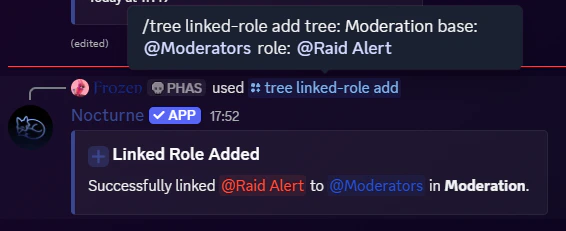
/tree linked-role add tree:Moderation base:@Moderators role:@Raid Alert
```
 The base role you specify must already be configured in the tree you are going to use it in.
When you run `/tree view [tree]` (with the `[tree]` parameter), you will see the linked roles as subpoints below the associated base role.
The base role you specify must already be configured in the tree you are going to use it in.
When you run `/tree view [tree]` (with the `[tree]` parameter), you will see the linked roles as subpoints below the associated base role.
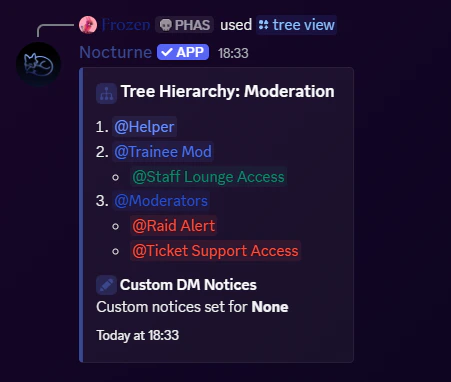 *Here, **@Staff Lounge Access** is a Linked Role for **@Trainee Mod**, while **@Raid alert** and **@Ticket Support Access** are Linked Roles for **@Moderators***
***
*Here, **@Staff Lounge Access** is a Linked Role for **@Trainee Mod**, while **@Raid alert** and **@Ticket Support Access** are Linked Roles for **@Moderators***
***
Removing a Linked Role
If you no longer want a secondary role to be assigned automatically, you can unlink it.
User: Manage Server
```text Command theme={null}
/tree linked-role remove
```
```text Example theme={null}
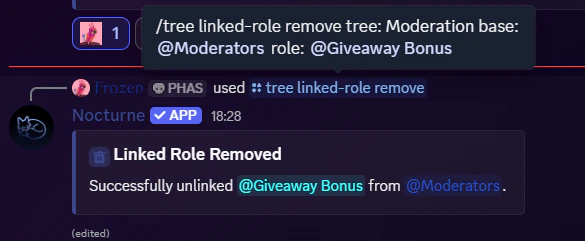
/tree linked-role remove tree:Moderation base:@Moderators role:@Giveaway Bonus
```
 Unlinking a role only stops Nocturne from automating it in the future. It will **not** automatically strip the role from users who already have it, and neither will it delete the role from the server.
***
Unlinking a role only stops Nocturne from automating it in the future. It will **not** automatically strip the role from users who already have it, and neither will it delete the role from the server.
***
Linked Role Persistence
Linked Roles can be configured to either stay as a user gets promoted, or they can be configured to be role-specific.
There is a configuration setting called **persistence,** which dictates this behaviour.
* If enabled, when a user is promoted to a new base role, they will keep the linked roles they got from the previous base roles.
* If disabled, when a user is promoted, they automatically lose the linked role associated with the previous base role and gain the linked roles associated with their new role.
*Read more about how to toggle this behaviour on the [Configuration Overview](/commands/config/overview) page.*