
Manage Roles permission can run /staff commands.
Whitelist Roles allow you to grant specific roles access to the /staff commands without giving them full administrative rights.
It is important to note that whitelisting a role only grants access to the staff actions (/staff hire, /staff fire, /staff promote, and /staff demote). Whitelisted users cannot alter the hierarchies using /tree or change bot settings using /config.
Managing a Whitelist Role
Whitelist management is handled through a single interactive panel. Upon running the command, Nocturne will open an ephemeral panel, showing all four staff permissions and their current state. You can make use of the buttons provided to toggle permission for each command. User: Manage Server- Command
- Visual Output
Command
Example
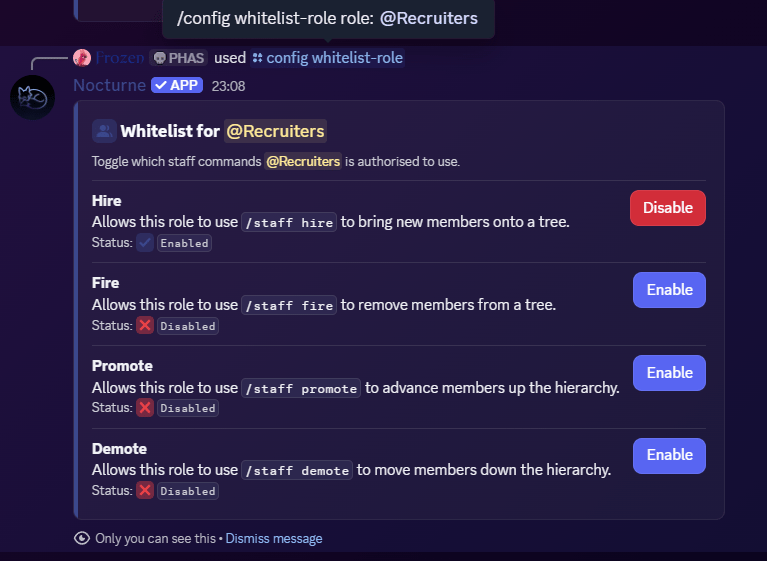
- A blue Enable button and the
Disabledstatus means the permission is currently disabled. Clicking the button grants the role access to that action. - A red Disable button and the
Enabledstatus means the permission is currently enabled. Clicking the button revokes access to that action.
If all four permissions are disabled for a role, Nocturne automatically removes it from the whitelist entirely.
Checking Whitelisted Role Status
To see an overview of all whitelisted roles and which actions they have access to, run/config view. It will list every whitelisted role alongside its permitted actions.